
Textbook pages are packed with dense information — paragraphs, diagrams, tables, and annotations. When you need to present that material in class or in a meeting, rebuilding every element manually takes hours. Reconstruction can accelerate the process by converting a photographed or scanned textbook page into an editable PowerPoint slide.
This guide explains how to capture textbook pages, prepare them for reconstruction, and adapt the results into a presentation-friendly format.
Important
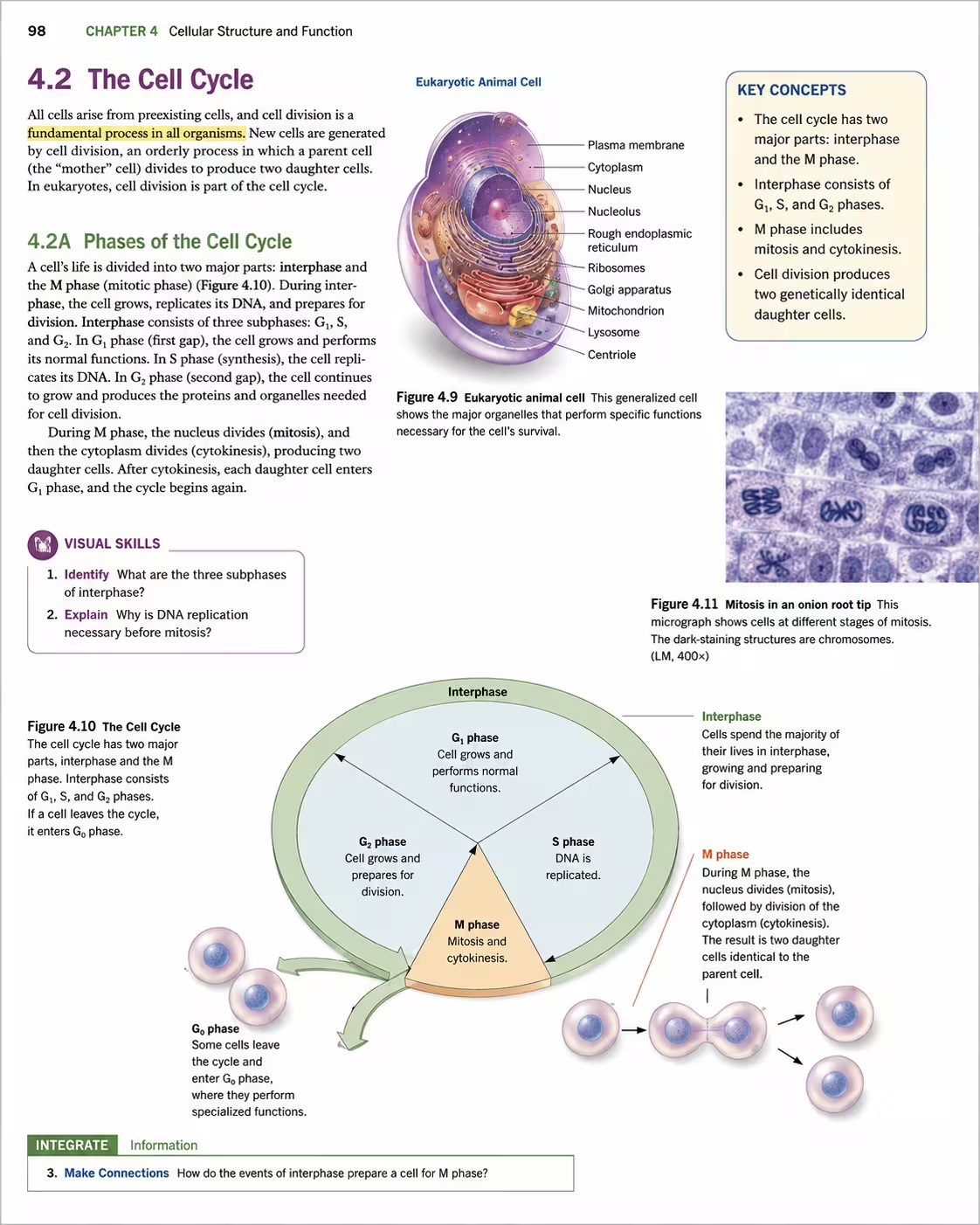
Can you turn a textbook page into a slide?
Yes. A textbook page photographed or scanned at sufficient quality can be reconstructed into an editable PowerPoint file. The text becomes editable, diagrams become separated graphics, and tables are rebuilt as structural elements.
The main challenge is that textbook pages are dense. A single page may contain more content than fits comfortably on one slide. The reconstruction gives you an editable starting point, but you will likely want to split the material across multiple slides or summarize key points.
| Content type | Presentation use | Recommended approach |
|---|---|---|
| Key definitions and concepts | Bullet slides | Extract and simplify |
| Diagrams and illustrations | Visual slides | Preserve and enlarge |
| Data tables | Comparison slides | Rebuild as structured tables |
| Dense paragraphs | Speaker notes or handouts | Summarize, do not copy verbatim |
What textbook content works best?
Not all textbook content translates equally well to slides.
- Clear headings and subheadings that can become slide titles
- Diagrams, flowcharts, and illustrations with labels
- Tables with well-defined rows and columns
- Formulas and equations rendered as text or simple graphics
- Bulleted or numbered lists
Best: Diagrams with labels
Visual elements with clear text annotations are easy to reconstruct and highly effective on slides.
Good: Structured tables
Data tables rebuild well if cell borders and text are legible in the source image.
Fair: Dense paragraphs
Text is recoverable, but long paragraphs should be broken into bullets or speaker notes.
Challenging: Handwritten annotations
Marginal notes and highlights may be misread or ignored by OCR.
How to convert a textbook page to PowerPoint
Photograph or scan the page in good lighting, keeping the camera flat above the surface to avoid distortion. Once you have a clear image, the conversion follows three steps.
1. Upload your textbook page image
Go to Photo to PowerPoint or Image to PowerPoint and upload the photo or scan of the textbook page.
2. Let SlideRebuild reconstruct the slide
The system recognizes the text, detects diagrams and tables, and rebuilds the page as an editable PowerPoint slide. Processing time depends on image size and content density.
3. Review and download your PPTX
Once reconstruction is complete, download the PPTX and open it in PowerPoint. Check text accuracy, diagram labels, and table structure, then restructure the content into slides if the original page was dense.
Related workflow
What becomes editable?
Reconstruction recovers the most useful elements for presentation reuse.
| Element | Result | Notes |
|---|---|---|
| Headings and body text | Editable text boxes | May need font substitution |
| Diagrams with labels | Separated graphics + text | Labels become editable |
| Tables | Rebuilt table structures | Verify merged cells and alignment |
| Photos and complex art | Image regions | Preserved for fidelity |
Adjusting for slide format
Textbook pages and presentation slides serve different purposes. A page is meant to be read in detail; a slide is meant to support spoken narration. After reconstruction, expect to make adjustments.
- Break one dense page into two or three focused slides
- Use reconstructed headings as slide titles
- Convert paragraphs into three to five bullet points
- Enlarge diagrams and move supporting text to speaker notes
- Increase font size to maintain readability from a distance
- Apply consistent slide layouts across the deck
The reconstructed file gives you editable building blocks. How you arrange them depends on your audience, speaking time, and the level of detail you need to convey.
Frequently asked questions
Can I reconstruct an entire textbook chapter?
Does reconstruction preserve page numbers and headers?
What about mathematical formulas?
Can highlighted or annotated pages be reconstructed?
Is it legal to convert textbook pages to PowerPoint?
Teach smarter
Turn textbook pages into editable presentation slides
Upload a photo or scan of a textbook page and reconstruct the text, diagrams, and tables as an editable PPTX draft.